Table of Contents
Rust와 WebAssembly로 만드는 "Hello World" 웹앱
wasm-pack을 사용하여 아주 간단하게 "Hello World" 웹 애플리케이션을 빌드하는 과정을 소개합니다.
사전 준비 (Prerequisites)
-
Rust 설치
-
wasm-pack 설치
일반 CMD 대신
Developer PowerShell for VS 2022를 실행하고 아래 명령을 입력합니다.cargo install wasm-pack
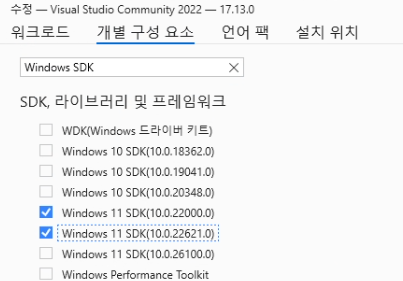
kernel32.lib 관련 오류가 발생하면, Visual Studio Installer 를 실행하고, 수정 버튼을 누른 후, 개별 구성 요소 탭으로 이동 후, Windows SDK 검색 후, Windows 11 SDK (10.0.22621.0) 를 설치해 줍니다.
프로젝트 생성 및 설정
프로젝트 생성
cargo new --lib hello-wasm
cd hello-wasm
Cargo.toml 설정
[lib]
crate-type = ["cdylib"]

[dependencies]
wasm-bindgen = "0.2"
Rust 코드 작성
src/lib.rs 파일을 열고 기존 내용을 지운 뒤, 브라우저의 alert 창을 띄우는 코드를 작성합니다.
use wasm_bindgen::prelude::*;

// JavaScript의 alert 함수를 사용하기 위한 선언
#[wasm_bindgen]
extern "C" {
    fn alert(s: &str);
}

// JavaScript에서 호출할 수 있도록 내보내는 함수
#[wasm_bindgen]
pub fn greet(name: &str) {
    alert(&format!("Hello, {}! Welcome to WASM.", name));
}
WebAssembly 빌드
빌드가 완료되면 프로젝트 폴더 내에 pkg/ 디렉토리가 생성됩니다.
wasm-pack build --target web웹페이지에서 실행하기
프로젝트 루트에 index.html을 만드세요.
<!DOCTYPE html>
<html lang="ko">
<head>
    <meta charset="UTF-8">
    <title>Rust Wasm Hello World</title>
</head>
<body>
    <script type="module">
        // 빌드된 pkg 폴더에서 init과 greet 함수를 가져옵니다.
        import init, { greet } from './pkg/hello_wasm.js';

        async function run() {
            // Wasm 모듈 초기화
            await init();
            // Rust 함수 실행
            greet("Rust World");
        }

        run();
    </script>
</body>
</html>
로컬 서버 실행
# Python이 있다면
python3 -m http.server
# 또는 npx 사용
npx serve .
이제 브라우저에서 localhost:8000 또는 localhost:3000 에 접속하면, Rust로 작성된 함수가 실행되어 "Hello, Rust World! Welcome to WASM." 이라는 알림창이 뜨는 것을 확인할 수 있습니다!
html 수정
Cargo.toml 설정 추가
[lib]
crate-type = ["cdylib"]

[dependencies]
wasm-bindgen = "0.2"
# HTML 조작을 위한 라이브러리 추가
web-sys = { version = "0.3", features = ['Document', 'Element', 'HtmlElement', 'Node', 'Window'] }
src/lib.rs 수정
use wasm_bindgen::prelude::*;

#[wasm_bindgen]
pub fn greet(name: &str) {
    let window = web_sys::window().expect("no global `window` exists");
    let document = window.document().expect("should have a document on window");

    // ID가 "output"인 엘리먼트를 찾아서 내용을 바꿉니다.
    if let Some(element) = document.get_element_by_id("output") {
        element.set_inner_html(&format!("Hello, {}! (from Rust)", name));
    }
}
HTML 파일 수정
<!DOCTYPE html>
<html lang="ko">
<head>
    <meta charset="UTF-8">
    <title>Rust Wasm Hello World</title>
</head>
<body>
    <h1 id="output">기다리는 중...</h1>
    <script type="module">
        // 빌드된 pkg 폴더에서 init과 greet 함수를 가져옵니다.
        import init, { greet } from './pkg/hello_wasm.js';

        async function run() {
            // Wasm 모듈 초기화
            await init();
            // Rust 함수 실행
            greet("Rust World");
        }

        run();
    </script>
</body>
</html>
빌드 및 실행
wasm-pack build --target web# Python이 있다면
python3 -m http.server
# 또는 npx 사용
npx serve .