Table of Contents
[Vue.js] VueJS 3 시작하기: 설치부터 Hello World까지
Node.js 설치
여기 에서 Node.js 최신버전을 다운받아 설치합니다.
# 설치확인
node -v
v22.16.0

npm -v
10.9.2
VSCode 및 확장 플러그인 설정
- VSCode 설치
- Vue (Official) 확장 설치
Vue 3 프로젝트 생성
npm create vue@latest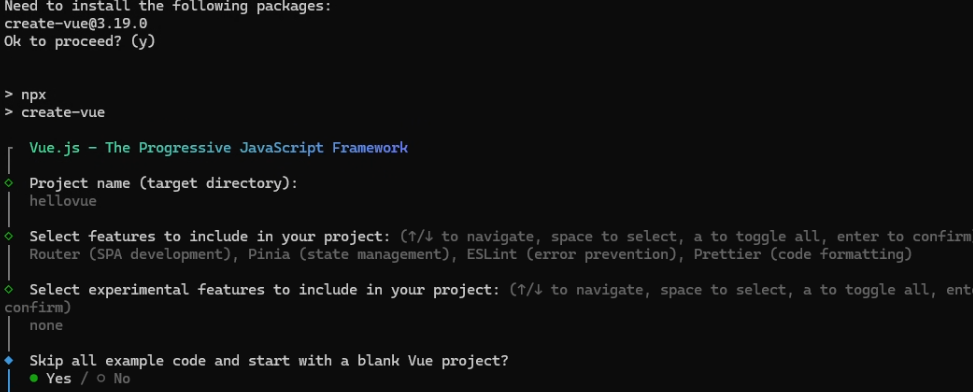
cd hellovue
npm install
Hello World
src/App.vue 파일을 생성하고 아래 코드를 입력합니다.
<template>
  <div class="container">
    <h1>{{ message }}</h1>
  </div>
</template>

<script setup>
import { ref } from 'vue'

// 반응형 데이터 정의
const message = ref('Hello, World!')
</script>

<style scoped>
.container {
  display: flex;
  justify-content: center;
  align-items: center;
  height: 100vh;
  font-family: Arial, sans-serif;
}
h1 {
  color: #42b883; /* Vue 공식 로고 색상 */
  font-size: 3rem;
}
</style>
프로젝트 실행
npm run dev브라우저에서 http://localhost:5173/ 을 열어 실행된 화면을 확인합니다.